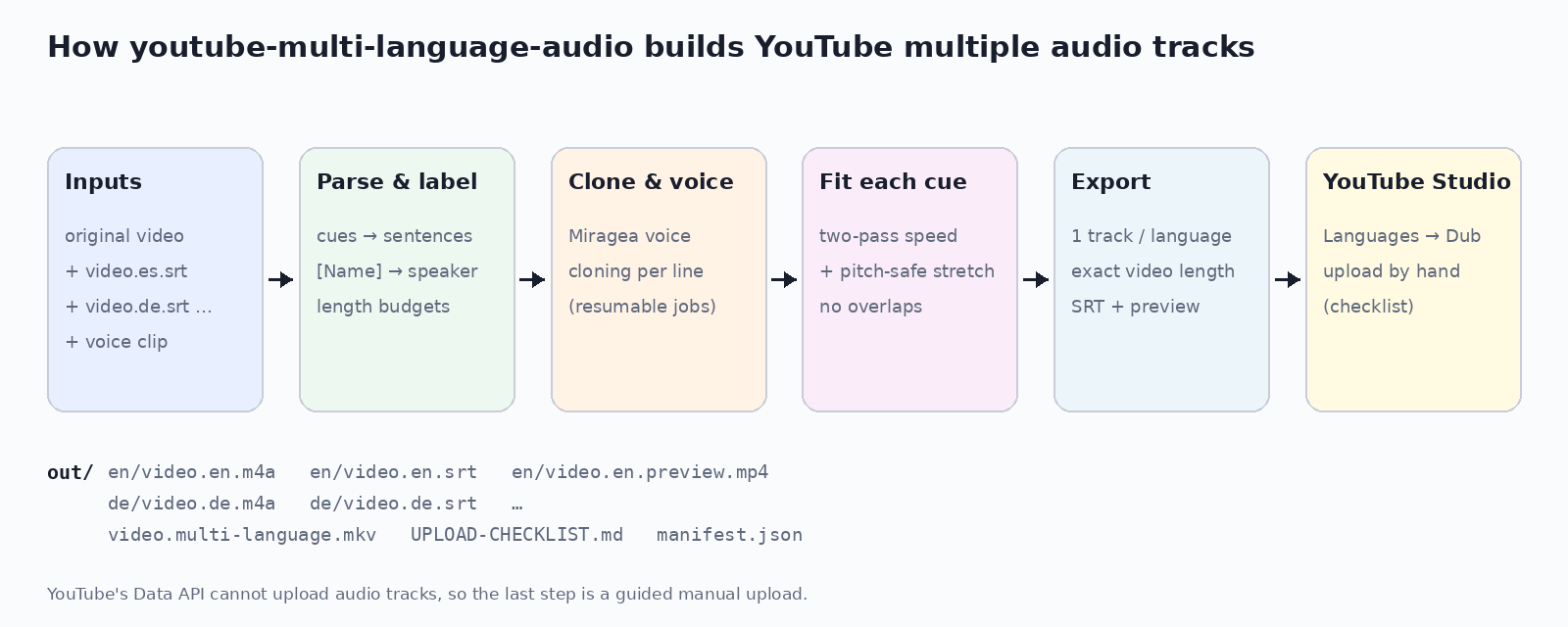
youtube-multi-language-audio is an open-source Python command-line tool that turns translated subtitle files (SRT/VTT) and the original video into dubbed audio tracks for YouTube's multi-language audio feature. It voices every subtitle cue in a cloned voice, fits each line into its cue's time slot, and exports one upload-ready track per language, exactly as long as the video, with re-timed captions and a YouTube Studio checklist. A self-hosted alternative to YouTube auto dubbing. Code on GitHub (MIT).

An 11.3 s Spanish two-person clip, dubbed from translated subtitles labelled [Marco] and [Lucia]. Each speaker has a cloned voice (CMU ARCTIC reference clips).
export MIRAGEA_API_KEY=...   # https://miragea.ai/workspace/api
uvx --from git+https://github.com/RTY2345RR/youtube-multi-language-audio ytmla dub \
  my-video.mp4 my-video.es.srt my-video.de.srt my-video.pt-BR.srt --voice my-voice.wav
Then follow UPLOAD-CHECKLIST.md: YouTube Studio → Languages → Add language → Dub → upload the track. Using an AI agent? Install https://miragea.ai/skills/miragea-audio/install.md
--clone-from-video 12-24).[Name] labels: one cloned voice per speaker.ytmla check flags translated lines that are too long for their slot.| youtube-multi-language-audio | Auto-Synced-Translated-Dubs | YouTube auto dubbing | |
|---|---|---|---|
| Translation | Yours (any tool) | Google Cloud / DeepL | YouTube, automatic |
| Voice | Cloned, one per speaker | Stock Azure / Google TTS | YouTube's AI voices |
| Resume, fit check | Yes | No | n/a |
| License | MIT | AGPL-3.0 | Proprietary |
In YouTube Studio open Languages, choose the video, click Add language, then next to Dub click Add and select an audio-only file roughly as long as the video. youtube-multi-language-audio creates those files, one per language, plus a checklist.
No. The public YouTube Data API v3 cannot add audio tracks, so upload is a manual step in YouTube Studio. This tool stops at upload-ready files and a checklist.
YouTube says the feature is available to creators with access to Advanced features. If an automatic dub already exists for a language, delete it before uploading your own track.
Yes. You bring the translation and the dub uses your own cloned voice (or one per speaker), so the channel keeps sounding like you.
Each line starts at its subtitle cue and must end before the next one. Long lines are voiced again at a faster speaking speed, then stretched with pitch preserved up to a limit; anything left over is reported so you can shorten it.
One audio-only M4A (AAC, 48 kHz) per language, padded to the exact video length and named by language code, plus re-timed SRT captions and a preview MP4. WAV, MP3 and FLAC are optional.
Voices by the Miragea voice-cloning engine. Demo reference voices: CMU ARCTIC (bdl, slt), © Carnegie Mellon University, free for any use.